Wednesday, 30 March 2016

Components of the Database System Environment

Components of the Database System Environment
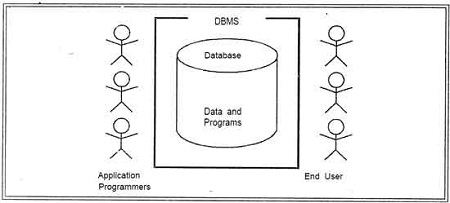
There are five major components in the database system environment and their interrelationship are.

• Hardware
• Software
• Data
• Users
• Procedures
                      What is DBMS? Advantages and Disadvantages of DBMS.
1.Hardware: The hardware is the actual computer system used for keeping and accessing the database. Conventional DBMS hardware consists of secondary storage devices, usually hard disks, on which the database physically resides, together with the associated Input-Output devices, device controllers and· so forth. Databases run on a' range of machines, from Microcomputers to large mainframes. Other hardware issues for a DBMS includes database machines, which is hardware designed specifically to support a database system.
2. Software: The software is the actual DBMS. Between the physical database itself (i.e. the data as actually stored) and the users of the system is a layer of software, usually called the Database Management System or DBMS. All requests from users for access to the database are handled by the DBMS. One general function provided by the DBMS is thus the shielding of database users from complex hardware-level detail.
The DBMS allows the users to communicate with the database. In a sense, it is the mediator between the database and the users. The DBMS controls the access and helps to maintain the consistency of the data. Utilities are usually included as part of the DBMS. Some of the most common utilities are report writers and application development.
                         What is DBMS? Advantages and Disadvantages of DBMS.
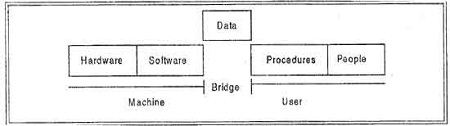
3. Data : It is the most important component of DBMS environment from the end users point of view. As shown in observes that data acts as a bridge between the machine components and the user components. The database contains the operational data and the meta-data, the 'data about data'.
The database should contain all the data needed by the organization. One of the major features of databases is that the actual data are separated from the programs that use the data. A database should always be designed, built and populated for a particular audience and for a specific purpose.
4. Users : There are a number of users who can access or retrieve data on demand using the applications and interfaces provided by the DBMS. Each type of user needs different software capabilities. The users of a database system can be classified in the following groups, depending on their degrees of expertise or the mode of their interactions with the DBMS. The users can be:
• Naive Users
• Online Users
• Application Programmers
• Sophisticated Users
• Data Base Administrator (DBA)
Naive Users: Naive Users are those users who need not be aware of the presence of the database system or any other system supporting their usage. Naive users are end users of the database who work through a menu driven application program, where the type and range of response is always indicated to the user.
A user of an Automatic Teller Machine (ATM) falls in this category. The user is instructed through each step of a transaction. He or she then responds by pressing a coded key or entering a numeric value. The operations that can be performed by valve users are very limited and affect only a precise portion of the database. For example, in the case of the user of the Automatic Teller Machine, user's action affects only one or more of his/her own accounts.
Online Users : Online users are those who may communicate with the database directly via an online terminal or indirectly via a user interface and application program. These users are aware of the presence of the database system and may have acquired a certain amount of expertise with in the limited interaction permitted with a database.
Sophisticated Users : Such users interact with the system without ,writing programs.
Instead, they form their requests in database query language. Each such query is submitted to a very processor whose function is to breakdown DML statement into instructions that the storage manager understands.
Specialized Users : Such users are those ,who write specialized database application that do not fit into the fractional data-processing framework. For example: Computer-aided design systems, knowledge base and expert system, systems that store data with complex data types (for example, graphics data and audio data).
Application Programmers : Professional programmers are those who are responsible for developing application programs or user interface. The application programs could be written using general purpose programming language or the commands available to manipulate a database.
Database Administrator: The database administrator (DBA) is the person or group in charge for implementing the database system ,within an organization. The "DBA has all the system privileges allowed by the DBMS and can assign (grant) and remove (revoke) levels of access (privileges) to and from other users. DBA is also responsible for the evaluation, selection and implementation of DBMS package. 
5. Procedures: Procedures refer to the instructions and rules that govern the design and use of the database. The users of the system and the staff that manage the database require documented procedures on how to use or run the system.
These may consist of instructions on how to:
• Log on to the DBMS.
• Use a particular DBMS facility or application program.
• Start and stop the DBMS.
• Make backup copies of the database.
• Handle hardware or software failures.


Change the structure of a table, reorganize the database across multiple disks, improve performance, or archive data to secondary storage.

Monday, 21 March 2016

Advantage and Disadvantage of DDBMS

A DDBMS (distributed database management system) is a centralized application that manages a single logical database   as if it were all stored on the same computer. The DDBMS synchronizes all the data periodically, and in cases where multiple users must access the same data, ensures that updates and deletes performed on the data at one location will be automatically reflected in the data stored elsewhere.
The distribution of data and applications has potential advantages over traditional centralized database systems. Unfortunately, there are also disadvantages; in this section we review the advantages and disadvantages of DDBMS.
Advantages
There are following advantages of DDBMs:
Reflects organizational structure Many organizations are naturally distributed over several locations. For example, a bank has many offices in different cities. It is natural for databases used in such an application to be distributed over these locations. A bank may keep a database at each branch office containing details such things as the staff that work at that location, the account information of customers etc.
The staff at a branch office will make local inquiries of the database. The company headquarters may wish to make global inquiries involving the access of data at all or a number of branches.
Improved share ability and local autonomy The geographical distribution of an organization can be reflected in the distribution of the data; users at one site can access data stored at other sites. Data can be placed at the site close to the users who normally use that data. In this way, users have local control of the data, and they can consequently establish and enforce local policies regarding the use of this data. A global database administrator (DBA) is responsible for the entire system. Generally, part of this responsibility is assigned the local level, so that the local DBA can manage the local DBMS.
Improved availability In a centralized DBMS, a computer failure terminates the applications of the DBMS. However, a failure at one site of a DDBMS, or a failure of a communication link making\ some sites inaccessible, does not make the entire system in opera bite. Distributed DBMSs are designed to continue to function despite such failures. If a single node fails, the system may be able to reroute the failed node's requests to another site.
Improved reliability
As data may be replicated so that it exists at more than one site, the failure of a node or a communication link does not necessarily make the data inaccessible.
Improved Performance As the data is located near the site of 'greatest demand', and given the inherent parallelism of distributed DBMSs, speed of database access may be better than that achievable from a remote centralized database. Furthermore, since each site handles only a part of the entire database, there may not be the same contention for CPU and I/O services as characterized by a centralized DBMS.
Economics
It is now generally accepted that it costs much less to create a system of smaller computers with the equivalent power of a single large computer. This makes it more cost effective for corporate divisions and departments to obtain separate computers. It is also much more cost-effective to add workstations· to a network than to update a mainframe system.
The second potential cost saving occurs where database are geographically remote and the applications require access to distributed data. In such cases, owing to the relative expense of data being transmitted across the network as opposed to the cost of local access, it may be much more economical to partition the application and perform the processing locally at each site.
Modular growth
In a distributed environment, it is much easier to handle expansion. New sites can be added to the network without affecting the operations of other sites. This flexibility allows an organization to expand relatively easily. Adding processing and storage power to the network can usually handle the increase in database size. In a centralized DBMS, growth may entail changes to both hardware (the procurement of a more powerful system) and software (the procurement of a more powerful or more configurable DBMS).
Disadvantages of DDBMS
There are following disadvantages of DDBMSs:
Complexity
A distributed DBMS that hides the distributed nature from the user and provides an acceptable level of performance, reliability, availability is inherently more complex then a centralized DBMS. The fact that data can be replicated also adds an extra level of complexity to the distributed DBMS. If the software does not handle data replication adequately, there wi1l be degradation in availability, reliability and performance compared with the centralized system, and the advantages we cites above will become disadvantages.
Cost
Increased complexity means that we can expect the procurement and maintenance costs for a DDBMS to be higher than those for a centralized DBMS. Furthermore, a distributed
DBMS requires additional hardware to establish a network between sites. There are ongoing communication costs incurred with the use of this network. There are also additional labor costs to manage and maintain the local DBMSs and the underlying network.
Security
In a centralized system, access to the data can be easily controlled. However, in a distributed DBMS not only does access to replicated data have to be controlled in multiple locations but also the network itself has to be made secure. In the past, networks were regarded as an insecure communication medium. Although this is still partially true, significant developments have been made to make networks more secure.
Integrity control more difficult
Database integrity refers to the validity and consistency of stored data. Integrity is usually expressed in terms of constraints, which are consistency rules that the database is not permitted to violate. Enforcing integrity constraints generally requires access to a large amount of data that defines the constraints. In a distributed DBMS, the communication and processing costs that are required to enforce integrity constraints are high as compared to centralized system.
Lack of Standards
Although distributed DBMSs depend on effective communication, we are only now starting to see the appearance of standard communication and data access protocols. This lack of standards has significantly limited the potential of distributed DBMSs. There are also no tools or methodologies to help users convert a centralized DBMS into a distributed DBMS
Lack of experience
General-purpose distributed DBMSs have not been widely accepted, although many of the protocols and problems are well understood. Consequently, we do not yet have the same level of experience in industry as we have with centralized DBMSs. For a prospective adopter of this technology, this may be a significant deterrent.
Database design more complex
Besides the normal difficulties of designing a centralized database, the design of a distributed database has to take account of fragmentation of data, allocation of fragmentation to specific sites, and data replication


Function of RDBMS

Few Important Functions are as follow:

1. Data Dictionary Management:
Data Dictionary is where the DBMS stores definitions of the data elements and their relationships (metadata). The DBMS uses this function to look up the required data component structures and relationships. When programs access data in a database they are basically going through the DBMS. This function removes structural and data dependency and provides the user with data abstraction. In turn, this makes things a lot easier on the end user. The Data Dictionary is often hidden from the user and is used by Database Administrators and Programmers.

2. Data Storage Management:
This particular function is used for the storage of data and any related data entry forms or screen definitions, report definitions, data validation rules, procedural code, and structures that can handle video and picture formats. Users do not need to know how data is stored or manipulated. Also involved with this structure is a term called performance tuning that relates to a database’s efficiency in relation to storage and access speed.

3. Data Transformation and Presentation:
This function exists to transform any data entered into required data structures. By using the data transformation and presentation function the DBMS can determine the difference between logical and physical data formats.

4. Security Management:
This is one of the most important functions in the DBMS. Security management sets rules that determine specific users that are allowed to access the database. Users are given a username and password or sometimes through biometric authentication (such as a fingerprint or retina scan) but these types of authentication tend to be more costly. This function also sets restraints on what specific data any user can see or manage.

5. Multiuser Access Control:
Data integrity and data consistency are the basis of this function. Multiuser access control is a very useful tool in a DBMS, it enables multiple users to access the database simultaneously without affecting the integrity of the database.

6. Backup and Recovery Management:
Backup and recovery is brought to mind whenever there is potential outside threats to a database. For example if there is a power outage, recovery management is how long it takes to recover the database after the outage. Backup management refers to the data safety and integrity; for example backing up all your mp3 files on a disk.

7. Data Integrity Management:
The DBMS enforces these rules to reduce things such as data redundancy, which is when data is stored in more than one place unnecessarily, and maximizing data consistency, making sure database is returning correct/same answer each time for same question asked.

8. Database Access Languages and Application Programming Interfaces:
A query language is a nonprocedural language. An example of this is SQL (structured query language). SQL is the most common query language supported by the majority of DBMS vendors. The use of this language makes it easy for user to specify what they want done without the headache of explaining how to specifically do it.

9. Database Communication Interfaces:
This refers to how a DBMS can accept different end user requests through different network environments. An example of this can be easily related to the internet. A DBMS can provide access to the database using the Internet through Web Browsers (Mozilla Firefox, Internet Explorer, Netscape).

10. Transaction Management:
This refers to how a DBMS must supply a method that will guarantee that all the updates in a given transaction are made or not made. All transactions must follow what is called the ACID properties.
A – Atomicity: states a transaction is an indivisible unit that is either performed as a whole and not by its parts, or not performed at all. It is the responsibility of recovery management to make sure this takes place.
C – Consistency: A transaction must alter the database from one constant state to another constant state.
I – Isolation: Transactions must be executed independently of one another. Part of a transaction in progress should not be able to be seen by another transaction.

D – Durability: A successfully completed transaction is recorded permanently in the database and must not be lost due to failures.

Sunday, 28 June 2015

Types of Database USER

DBMS is a multi-user  software system. It allows multiple user of different category to use the DBMS software. Here we are discussing about different category of DBMS user. 

Database Administrator (DBA): The DBA is a person or a group of persons who is responsible for the management of the database. DBA is custodian of entire data of the organization.  The DBA is responsible for authorizing access to the database by grant and revoke permis­sions to the users, for coordinating and monitoring its use, managing backups and repairing damage due to hardware and/or software failures and for acquiring hardware and software resources as needed. In case of small organization the role of DBA is performed by a single person and in case of large organizations there is a group of DBA's who share responsibilities.
Database Designers: They are responsible for identifying the data to be stored in the database and for choosing appropriate structure to represent and store the data. It is the responsibility of database designers to communicate with all prospective of the database users in order to understand their requirements so that they can create a design that meets their requirements.
End Users: End Users are the people who interact with the database through applications or utilities. The various categories of end users are:
• Casual End Users - These Users occasionally access the database but may need different information each time. They use sophisticated database Query language to specify their requests. For example: High level Managers who access the data weekly or biweekly.
• Native End Users - These users frequently query and update the database using standard types of Queries. The operations that can be performed by this class of users are very limited and effect precise portion of the database.
For example: - Reservation clerks for airlines/hotels check availability for given request and make reservations. Also, persons using Automated Teller Machines (ATM's) fall under this category as he has access to limited portion of the database.
• Standalone end Users/On-line End Users - Those end Users who interact with the database directly via on-line terminal or indirectly through Menu or graphics based Interfaces.
For example: - User of a text package, library management software that store variety of library data such as issue and return of books for fine purposes.
Application Programmers
Application Programmers are responsible for writing application programs that use the data­base. These programs could be written in General Purpose Programming languages such as Visual Basic, Developer, C, FORTRAN, COBOL etc. to manipulate the database. These application programs operate on the data to perform various operations such as retaining information, creating new.


Tuesday, 23 June 2015

Concepts of various keys in DBMS

Definition of Various Keys in DBMS:
(I)            Candidate Key – It is also defined as possible primary key. It means a key which is candidate for becoming a primary key. It can be defined as minimal Super Key or irreducible Super Key.
 In other words an attribute or a combination of attribute that identifies the record uniquely but none of its proper subsets can identify the records uniquely.
E.g. of Candidate Key
1.    ID
2.    Name, Address.
Let us consider Employee Table (ID , Name , Address , Salary , Department_ID)
For above table we have only two Candidate Keys (i.e. Irreducible Super Key) used to identify the records from the table uniquely. ID Key can identify the record uniquely and similarly combination of Name and Address can identify the record uniquely, but neither Name nor Address can be used to identify the records uniquely as it might be possible that we have two employees with similar name or two employees from the same house.
(II)          Primary Key – A Candidate Key that is used by the database designer for unique identification of each row in a table is known as Primary Key. A Primary Key can consist of one or more attributes of a table.
When Primary Key consists of single attribute it is called as simple primary keyelse it is called as composit primary key
E.g. for defining Primary Key - Database designer can use one of the Candidate Key as a Primary Key. In this case we have “ID” and “Name, Address” as Candidate Key, we will consider “ID” Key.
(III) Super Key – An attribute or a combination of attribute that is used to identify the records uniquely is known as Super Key. A table can have many Super Keys.
E.g. of Super Key
1.    ID
2.    ID, Name
3.    ID, Address
4.    ID, Department_ID
5.    ID, Salary
6.    Name, Address
7.    Name, Address, Department_ID
So on as any combination which can identify the records uniquely will be a Super Key.

(IV) Foreign Key – A foreign key is an attribute or combination of attributes in one base table that points to the primary key of another table. The purpose of the foreign key is to ensure referential integrity of the data i.e. only values that are supposed to appear in the database are permitted.
E.g. of Foreign Key – Let consider we have another table i.e. Department Table with Attributes “Department_ID”, “Department_Name”, “Manager_ID”, ”Location_ID” with Department_ID as an Primary Key. Now the Department_ID attribute of Employee Table (dependent or child table) can be defined as the Foreign Key as it can reference to the Department_ID attribute of the Departments table (the referenced or parent table), a Foreign Key value must match an existing value in the parent table or be NULL.
Foreign Key and Primary Key may exist together in single table.
(V) Composite Key – If we use multiple attributes to create a Primary Key then that Primary Key is called Composite Key (also called a Compound Key or Concatenated Key).
E.g. of Composite Key, if we have used “Name, Address” as a Primary Key then it will be our Composite Key.
(VI) Alternate Key – Alternate Key can be any of the Candidate Keys except for the Primary Key.
E.g. of Alternate Key is “Name, Address” as it is the only other Candidate Key which is not a Primary Key.
(VII) Secondary Key – The attributes that are not even the Super Key but can be still used for identification of records (not unique) are known as Secondary Key.
E.g. of Secondary Key can be Name, Address, Salary, Department_ID etc. as they can identify the records but they might not be unique.


Saturday, 20 June 2015

Introduction To SQL. Video Link


ORACLE COMMAND

Delete: The DELETE command is used to remove rows from a table. A WHERE clause can be used to only remove some rows. If no WHERE condition is specified, all rows will be removed. After performing a DELETE operation you need to COMMIT or ROLLBACK the transaction to make the change permanent or to undo it.
Example- To delete any specific row you would use:
DELETE FROM MyTable WHERE id=5
This would delete the row with the id = 5 If no conditions are matched it would delete all rows

Drop: The DROP command removes a table from the database. All the tables' rows, indexes and privileges will also be removed. No DML triggers will be fired. The operation cannot be rolled back.
Example- DROP TABLE MyTable
This would delete the whole table and its constraints.

ROLLBACK:
To undo the work/changes that are committed or done by COMMIT clause we use the ROLLBACK Command. It is reverse of COMMIT. It rollbacks all the changes of the current transactions. In other words ROLLBACK restore the state of the database to the last commit point.
Syntax
DELETE FROM table_name
ROLLBAC

COMMIT:

Whatever changes we have made/ done in our transaction cannot be fixed until we commit that transaction and this can be possible by using COMMIT statement. In other words it will make our changes permanent that cannot be rolled back.
Syntax
COMMIT;
_____________________________________________________________________________


Alter: Alter is a SQL command that is used to modify, delete or add a column to an existing table in a database. Alter is considered as a DDL statement. Commands that are used to define the structure of a database (database schema) are called DDL statements. Following is the typical syntax of an alter statement that is used to add a column to an existing table.
ALTER TABLE        tableName
ADD                       newColumnName dataTypeOfNewColumn
In here tableName is the name of the existing table that needs to be altered and newColumnName is the name given to the new column that is added to the table. dataTypeOfNewColumn provides the data type of the new column.
Update: Update is a SQL command that is used to update existing records in a database. Update is considered as a DML statement. Commands that are used to manage data without altering the data base schema are called DML statements. Following is the typical syntax of an update statement.
UPDATE                   tableName
SET                          column1Name=value1, column2Name=value2, …

WHERE                    columnXName=someValue
In the above example tableName should be replaced with the name of the table you want to modify the records in. The column1Name, column2Name in the SET clause are the names of the columns in the table in which the values of the record that needs to be modified. value1 and value2 are the new values that should be inserted in the record. WHERE clause specifies the set of records needs to be updated in the table. WEHRE clause could also be omitted from the UPDATE statement. Then all the records in the table would be updated with the values provided in the SET clause.

NORMALIZATION

Normalization is the process of efficiently organizing data in a database. There are two goals of the normalization process:

·         Eliminating redundant data (storing the same data in more than one table)

·         Ensuring data dependencies make sense (only storing related data in a table)

Both of these are worthy goals as they reduce the amount of space a database consumes and ensure that data is logically stored.

In relational database, SQL can be used to manipulate data in the following ways: insert new data, delete unwanted data, and update existing data. Similarly, in an un-normalized design, there are 3 problems that can occur when we work with the data. To understand these problems I take an example of Student table:

Student_ID
Student_Name
Address
Subject_Opted
401
Arun
Delhi
Maths
402
Sulekha
Pune
Biology
403
Pinky
Kolkata
Maths
404
Ramesh
Delhi
Physics

Update anomaly: The same data can be scattered on multiple rows therefore updates to the table may result in logical inconsistencies. For example: To update address of a student who occurs twice or more than twice in a table, we will have to update “Student_Address” column in all the rows, else the table is left in an inconsistent state.
Insertion anomaly: We tried to insert data in a record that does not exist at all. Suppose for a new admission, we have a Student_ID, Student_Name and Address of a student but if student has not opted for any subjects yet then we have to insert NULL there, leading to Insertion Anomaly.
Deletion anomaly: If (Student_ID) 401 has only one subject and temporarily he drops it, when we delete that row, entire student record will be deleted along with it.

Normalization is a method to remove all these anomalies and bring the database to a consistent state. There are several different levels of database normalization.
1.       1st Normal Form (1NF)
·         Eliminate repeating groups in individual tables.
·         Create a separate table for each set of related data.
·         Identify each set of related data with a primary key.

2.       2nd Normal Form (2NF)
·         Meet all the requirements of the first normal form.
·         The non key attributes should be fully dependent on composite primary key, partial dependency is not allowed.
·         Relate the tables with a foreign key.

3.       3rd Normal Form (3NF)
To achieve this normal form we have to eliminate the non-key values which are not fully functionally dependent on primary key of the table.

4.       Other Normalization Forms
Fourth normal form, also called Boyce Codd Normal Form (BCNF), and fifth normal form do exist, but are rarely considered in practical design.

To explain the levels I take an example of unnormalized “Student” table:

Student_ID
Student_Name
Address
Subject_Opted
401
Rajeev
Delhi
Maths,Physics
402
Sulekha
Pune
Biology,chemistry
403
Pinky
Kolkata
Arts

After applying the rules of normalization To bring this table to first normal form, we split the table into multiple tables and now we have the resulting tables:

Table: Student
Student_ID
Student_Name
Address
401
Rajeev
Delhi
402
Sulekha
Pune
403
Pinky
Kolkata

Table: Subjects
Subject_ID
Student_ID
Subject_Opted
801
401
Maths
802
401
Physics
803
402
Biology
804
402
Chemistry
805
403
Arts

Table: Student_Subjects
Subject_ID
Student_ID
801
401
802
401
803
402
804
402
805
403